Claude Fixed Android Accessibility Issues. Then It Created New Ones.
My first experiment: Claude builds an Android app
As described in this blog article, I found 8 WCAG failures after prompting Claude to build an Android app without accessibility guidance. Then I audited one user flow for WCAG 2.2 AA compliance.
I gave Claude the accessibility findings
I asked Claude Code (Opus 5.5) to fix the Android app for the 8 WCAG failures. I wanted to see how well Claude could fix these failures when given the accessibility findings but not implementation instructions.
To ensure Claude didn’t apply my solutions in this PR, I created a new GitHub repo that copied only the original repo’s main branch. I also didn’t include the original README, as it includes details from the first experiment, including the first blog article.
With the new repo, I told Claude the problem, but not how to fix it. For example: On the “Vega hold-or-exit” card, the “41m” badge is announcing on TalkBack as “41 meters”. It should announce as “41 minutes”.

Claude successfully remediated them (almost)
Claude functionally fixed all eight WCAG failures in this PR without implementation instructions, with one caveat described in the next section, “Fixing one issue required new UI”. I confirmed the fixes using TalkBack, external keyboard, or the WebAIM color contrast checker.
However, one implementation differed from how I would have addressed the issue.
To ensure the accessibility button role is announced on TalkBack for the “Exit now,” “Hold,” and “Snooze” buttons, Claude wrapped the Text component with a Box component that uses a button role. I’d advise using the Button component instead to better ensure the buttons provide full accessibility behavior.

Fixing one issue required new UI
One failure I asked Claude to fix was a WCAG 3.3.4 violation, which requires mechanisms such as confirmation, review, or reversibility for certain high-consequence submissions.
Because WheelHouse is designed to test stock trades, I considered the criterion applicable. The “Exit now” and “Snooze” actions couldn’t be reversed or confirmed before taking effect. There also wasn’t an alternative way elsewhere in the app to recover from making the wrong choice. (When activated, the “Hold” button showed a bottom sheet with an option to cancel).
I told Claude that the “Exit now” and “Snooze” actions didn’t offer a way to confirm or undo the action, and asked it to address the potential WCAG 3.3.4 violation.
Claude proposed a couple of solutions. I asked it to implement confirmation steps similar to the existing “Hold” flow. Addressing this finding required Claude to create new confirmation flows. That gave me an opportunity to see whether the accessibility patterns we’d discussed earlier carried over to newly created UI—and whether Claude would introduce other issues.
The new UI reflected our earlier accessibility discussions
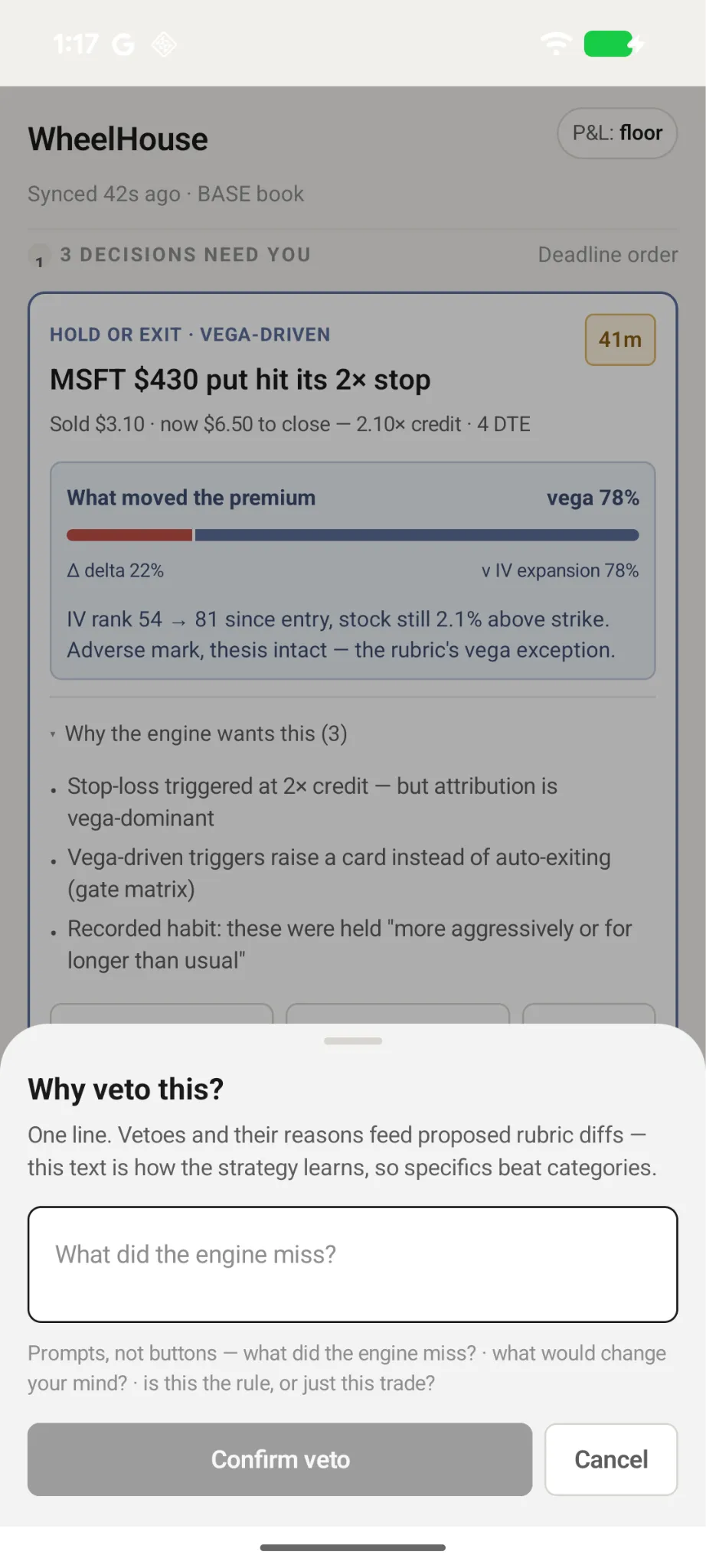
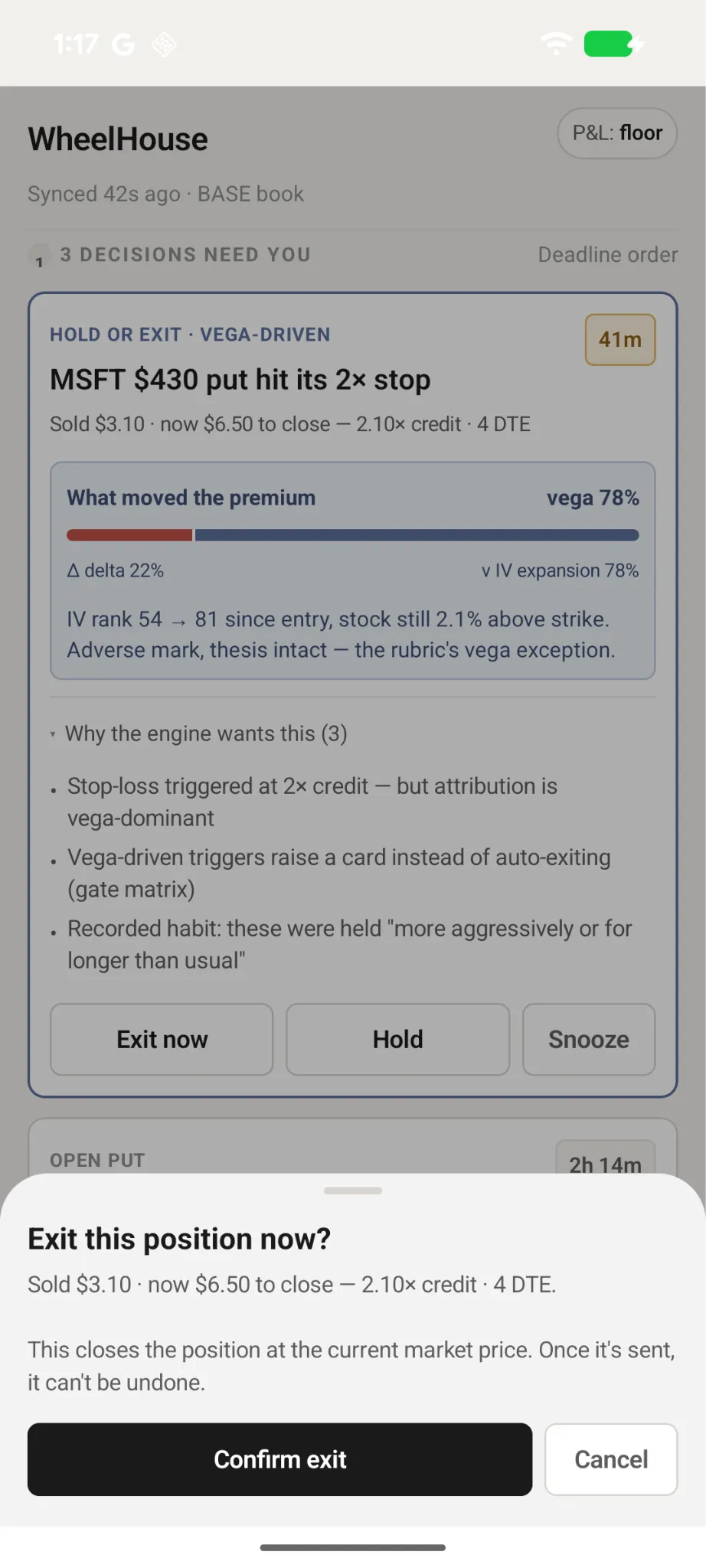
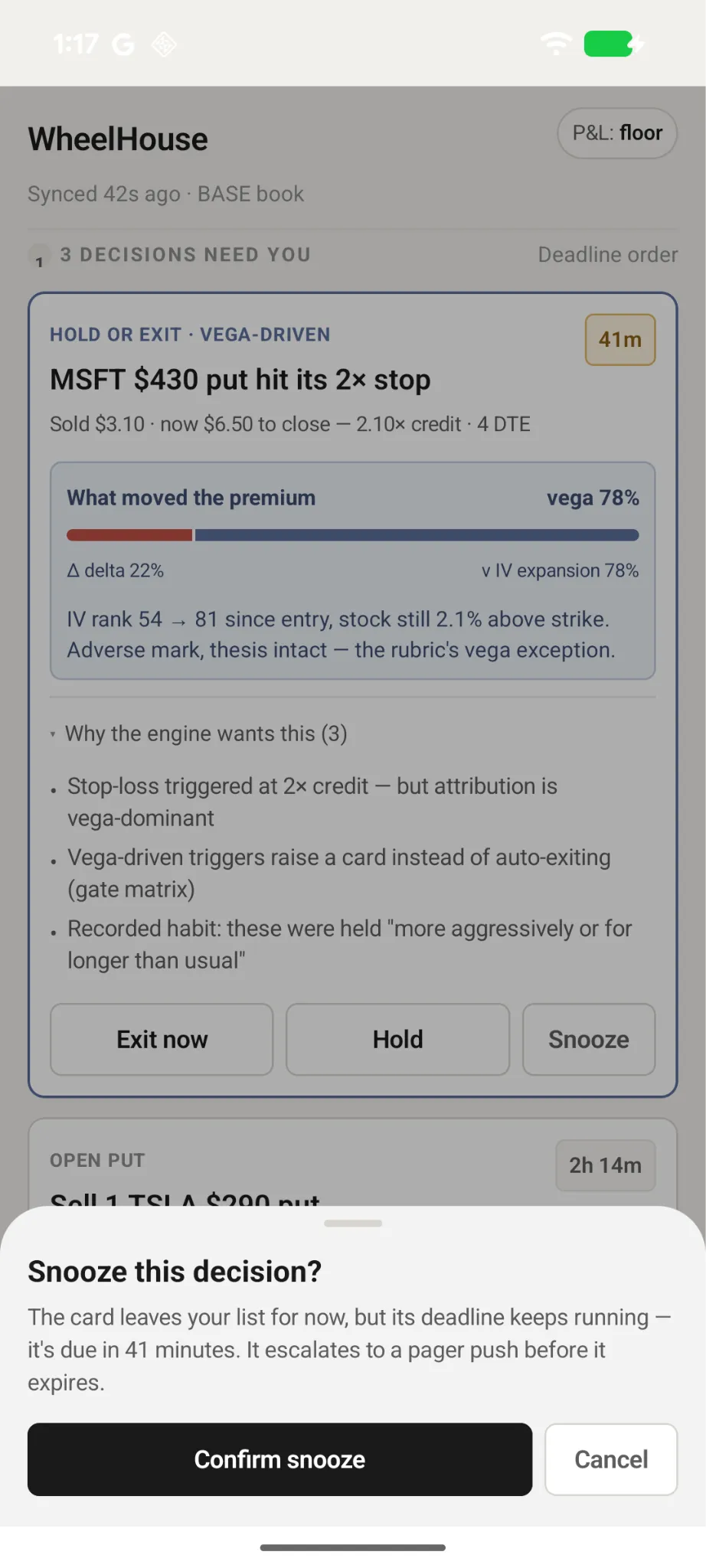
Claude created three bottom sheets, but they weren’t equally accessible.
| Bottom sheet | Built when | Heading role announced by TalkBack? | Pass color contrast? |
|---|---|---|---|
| Hold | Before accessibility fixes | No | No |
| Exit | After accessibility fixes | Yes | Yes |
| Snooze | After accessibility fixes | Yes | Yes |
I noticed that for the new bottom sheets, Claude already addressed similar accessibility patterns in the other issues. For example, there was a WCAG 1.3.1 violation because the card heading, i.e., “MSFT $430 put hit its 2x stop”, was styled as a heading but didn’t announce with a heading accessibility role on TalkBack. Claude successfully fixed this in this commit.
However, for the “Hold” bottom sheet, titled “Why veto this?,” the heading role wasn’t announced on TalkBack. But for the headings of the other bottom sheets, “Exit this position now?” and “Snooze this decision?”, the heading role was announced. These two bottom sheets were added in the same session after the missing heading role on the main card was fixed.
Another issue was that the subtext color contrast on the “Hold” bottom sheet, starting with “Prompts,” did not meet WCAG 1.4.3. The new bottom sheets passed color contrast. The bottom sheets were created after I had asked Claude to fix a color contrast issue with the “Sold $3.10 …” subtext on the main card.
The timing was interesting. Claude created the “Hold” bottom sheet before I asked Claude to fix the accessibility issues, and it had both the heading-role and color-contrast problems. Claude created the “Exit” and “Snooze” bottom sheets after we discussed and fixed those issues, and both passed those checks.
The timing suggests that our earlier accessibility discussions may have influenced how Claude implemented the new UI.
But it didn’t catch everything
However, for the new bottom sheets Claude added for the “Exit now” and “Snooze” buttons, Claude introduced another accessibility issue. The top handle is focusable, but missing an accessibility label and role. With a focus stop that announces nothing, a screen reader won’t know what this element does. The fix would be to either add a label and role or hide it from screen reader users, since they can already dismiss the bottom sheet with the “Cancel” button.
This suggests that Claude may carry accessibility patterns forward within a coding session, but that doesn’t mean it will catch every issue in new UI.
What did I still need to do as an accessibility engineer?
In this experiment, Claude drastically reduced the amount of implementation work required to remediate the accessibility issues. But it didn’t eliminate the need for accessibility expertise.
I still needed to:
- Identify the problems
- Determine the applicable WCAG criteria
- Evaluate the proposed implementation
- Verify the fixes with assistive technology
- Test the new UI for issues that hadn’t been discussed
In other words, the accessibility engineer’s role may shift from implementing every fix to identifying problems, specifying expected behavior, evaluating the AI-generated implementation, and independently verifying the results.
This was a small experiment with one app and one coding session. It doesn’t establish how reliably Claude will remediate accessibility issues in other projects, but it gives me a useful starting point for testing that question.
My next experiment: human-written code
I was surprised by how well Claude fixed the accessibility issues without needing implementation guidance. In my past experience, Claude and other AI models struggled to implement correctly unless I gave them explicit guidance. There were a couple of differences between this experience and my past experience, which dealt with:
- Human-written, not AI-written, code
- Cross-platform frameworks like React Native
However, because AI is improving so drastically, Claude may work just as well with human-written code and cross-platform frameworks. I’m curious to find out! In my next experiment, I’ll test whether Claude can identify and remediate accessibility issues in a human-written, cross-platform mobile app.
Thanks
Thank you Gemma Sweeney, Holli Smith, and Patrick Dowell for providing feedback on a previous version of this article.