I Built an Android App with Claude. Then I Tested Its Accessibility
The experiment
Does Claude build apps that are accessible out of the box? I decided to find out. I asked Claude to build a new app and then evaluated one user flow for accessibility. I deliberately didn’t ask Claude to make the app accessible. I wanted to see what accessibility issues would exist in an otherwise functional AI-generated application.
I audited one user flow for WCAG 2.2 AA compliance. WCAG, or Web Content Accessibility Guidelines, are internationally recognized guidelines for making digital content accessible. For my audit, I used several assistive technologies and tools, including TalkBack, Android’s screen reader.
A few notes:
- The app isn’t production-ready. The visual designs could use improvement, and I implemented only mock APIs.
- I only tested one user flow. I didn’t conduct a comprehensive audit of the entire app. (I did see some of the issues discussed below in other flows).
- I built the flow I tested with Claude Sonnet 5 using Claude Code. The app is written in Kotlin with Jetpack Compose.
- This article focuses on identifying accessibility issues, not on asking Claude to remediate them. I’m considering that as a follow-up experiment. This pull request includes my accessibility fixes. Claude wrote the commit and PR summaries.
- The app, called “WheelHouse”, is for options trading. It is an app idea from Patrick Dowell. This GitHub repo contains only the code relevant to the flow discussed in this article because the app is still in an early stage. The main branch contains the initial implementation, and the accessibility fixes are documented in the pull request.
How I built the flow with Claude
I purposely didn’t prompt Claude to consider accessibility while developing the WheelHouse Android app. With architecture requirements provided by Patrick, I asked Claude to develop the design requirements and wireframes. Once Claude created the wireframes and Patrick confirmed they reflected all the functional requirements, I asked Claude to build each screen in the wireframes.
What was audited for accessibility
For this article, I tested only 1 flow against all WCAG 2.2 AA criteria. I used a checklist I created for professional audits. I tested with TalkBack, an external keyboard, the WebAIM color contrast checker, and without any assistive technologies. I might go into my checklist and testing strategy more in a future article.
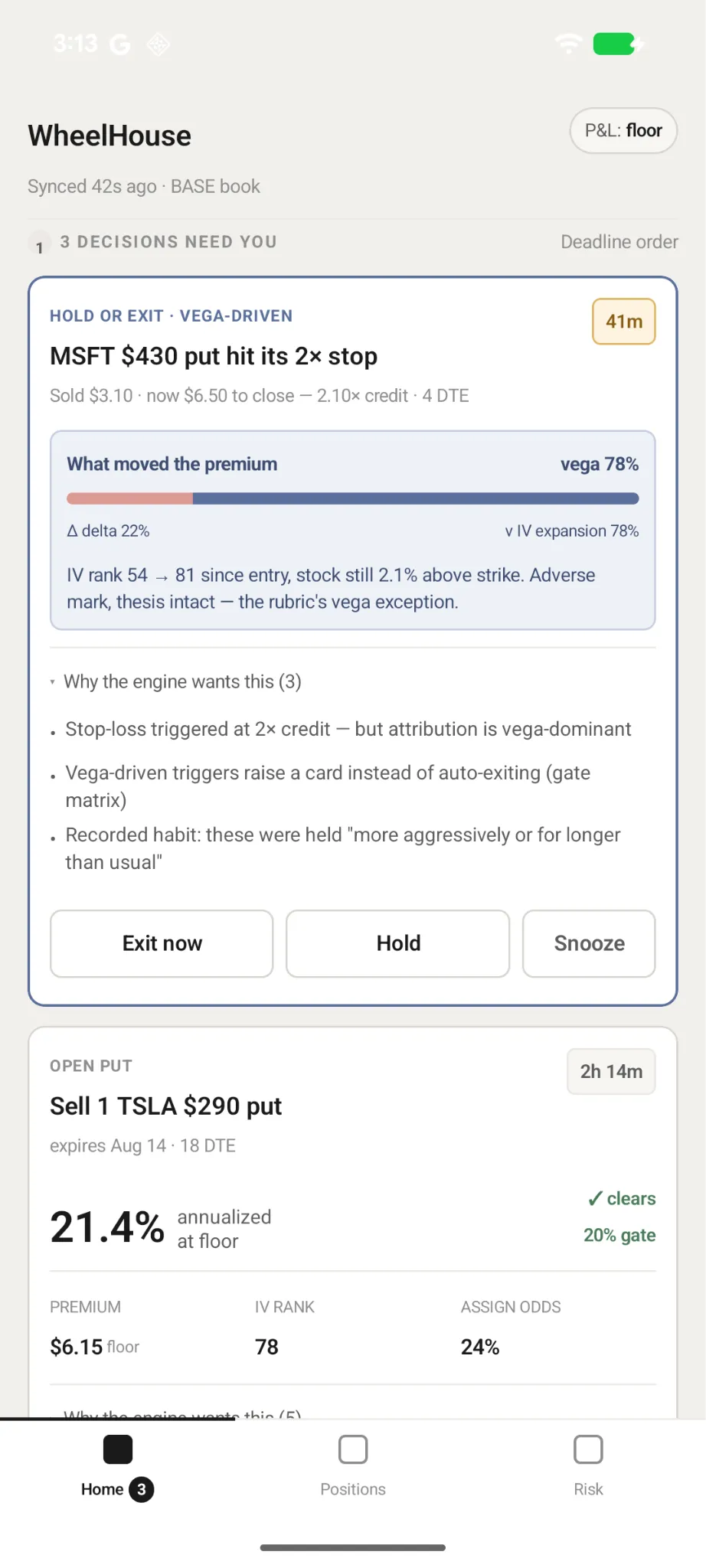
The flow I tested was responding to a pending proposal — the “Hold or Exit · Vega-Driven” card shown in the screenshot below. The app’s automatic sell rule has fired on a position, but the app’s own analysis suggests the loss stems from a spike in market volatility (what option traders call “vega”) rather than a bad trade. Instead of acting automatically, the app asks the user to decide, with a deadline. You don’t need to understand options trading to follow the accessibility findings below.
What I found
Of the 24 applicable WCAG AA criteria for this flow, 16 passed and 8 failed. I initially reported 9 failures, but further investigation revealed that one of them—WCAG 1.3.4 (Orientation)—was caused by my phone’s configuration, not the app. Rather than walk through all eight failures, I’m highlighting three findings that stood out to me and illustrate the accessibility issues I encountered.
#1 Accessibility semantics weren’t implemented correctly
This category stood out to me because I found several examples of missing or incorrectly implemented accessibility semantics. It wasn’t always obvious from the code that something was wrong; I had to confirm it with a screen reader.
Assistive technology users rely on semantics to understand an element’s purpose and how to interact with it.
I’m highlighting one example that wasn’t evident from the code, along with two other semantic issues I found in the same flow.

What I found
Claude added an accessible button role, but TalkBack didn’t announce it. The problem stemmed from how Android’s AccessibilityNodeInfo hierarchy inherits accessibility properties.
Why it matters
Because TalkBack didn’t announce the element as a button, TalkBack users might not know how to interact with it.
Fix
Use a button component instead of setting the role on a text component. More details in this PR.
Other semantic issues in the same flow
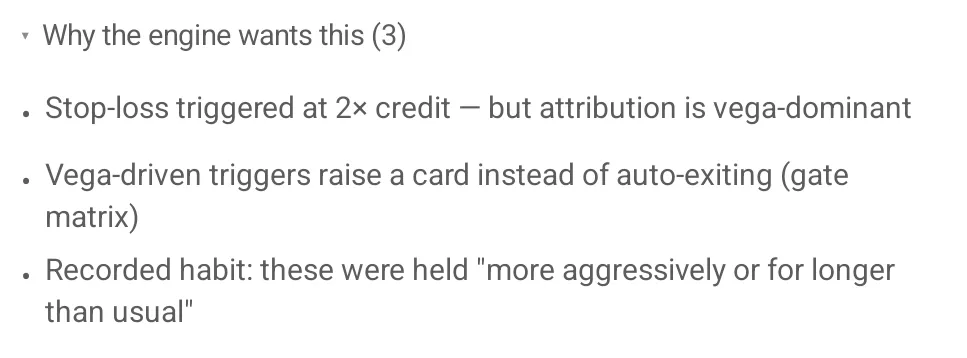
I also discovered a couple of other accessibility semantic issues.
When using TalkBack, a bulleted list didn’t announce each item’s position. For example, we’d expect the list item that begins with “Vega-driven triggers” to announce with “2 of 3”. Without this item’s position, TalkBack users didn’t get the same information about the items’ relationship that was conveyed visually. Use the CollectionInfo and CollectionItemInfo properties, which provide assistive technologies with placement information. More details in this PR.
In another case, an expandable button had its “expanded” and “collapsed” states added to its label instead of its state property. Including states in the label can confuse assistive technology users. If a state isn’t exposed through the correct property, the element may also behave incorrectly. To fix this issue, clearAndSetSemantics should be used on the parent element that includes the stateDescription. It is included in this PR.
#2 Text didn’t meet color contrast requirements
This failure stood out because it is a straightforward visual accessibility issue and relatively easy to test programmatically.
What I found
Using the WebAIM color contrast checker, I found that the subtext below the heading didn’t meet color contrast requirements.

The text had a contrast ratio of 3.27:1, which is below the WCAG 2.2 AA requirement of 4.5:1 for normal-sized text.
Why it matters
When color contrast isn’t high enough, people with visual impairments have a harder time reading content.
Fix
The fix involves updating text and background colors with a sufficient contrast ratio, which can be verified with the WebAIM color contrast checker.
#3 Unhandled abbreviation
This issue stood out because I’ve encountered it often. It’s trickier to detect because it requires understanding the page context and whether the text is used as an abbreviation.
What I found
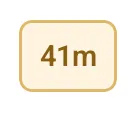
The app displayed “41m” to indicate that 41 minutes remained to make a decision. TalkBack announced it as “41 meters” because it interpreted “m” as meters.
Why it matters
A TalkBack user could be confused about what “41m” means and miss important information about how much time they have to make a decision.
Fix
Provide a full accessibility label such as “41 minutes remaining”. This can be added to the element’s contentDescription. More details in this PR.
The Eight Accessibility Findings
This section describes the 8 WCAG failures I found while auditing the user flow.
| WCAG Criterion | Finding |
|---|---|
| 1.1.1 Non-text Content | Decorative arrow up and down icons for expandable sections are exposed on TalkBack. The arrow icon in the chart explanation is announced on TalkBack as “arrow” instead of its meaning. |
| 1.3.1 Info and Relationships | The card heading isn’t announced on TalkBack as a heading. List items aren’t announced with their position, so TalkBack users don’t receive the same information about the items’ relationship that is conveyed visually. |
| 1.4.3 Contrast (Minimum) | Subtext that starts with “Sold $3.10…” doesn’t match the required color contrast ratio. |
| 1.4.4 Resize Text | At 200% text scaling, a space is missing between the left and right sides of the chart header. |
| 1.4.11 Non-text Contrast | “Delta” on the left side of the bar chart doesn’t match the required color contrast ratio. The focus indicator with an external keyboard also fails color contrast. |
| 2.4.6 Headings and Labels | Badge label “41m” announces on TalkBack as “41 meters” instead of “41 minutes”. |
| 3.3.4 Error Prevention (Legal, Financial, Data) | “Exit now” and “Snooze” buttons don’t provide a way to reverse or confirm action before it is submitted. |
| 4.1.2 Name, Role, Value | The “Exit now,” “Hold,” and “Snooze” controls don’t expose their button role correctly. The expandable “Why the engineer wants this (3)” control doesn’t expose its expanded/ |
In my original audit, I identified WCAG 1.3.4 (Orientation) as a failure because I couldn’t rotate the app into landscape orientation. When I revisited the issue, I discovered that my phone’s developer mode, not the app, caused the restriction. The app itself did not restrict the display orientation. I therefore removed this finding from the set of confirmed WCAG failures.
What does this mean for developers using AI?
These examples show that we can’t assume AI-generated code has been adequately evaluated for accessibility. The issues described in this article are also mistakes I regularly see in human-written code.
Developers using AI coding tools should treat accessibility as part of the development feedback loop, using automated checks, code review, and assistive technology testing rather than assuming the generated code has been adequately evaluated. As AI makes it easier to generate software, integrating accessibility evaluation into that loop becomes increasingly important.
Next topic
I’m considering a few follow-up experiments:
- I asked Claude to fix the accessibility issues I found. How well did it do?
- Can AI actually test an Android app for accessibility?
- How does accessibility compare between Fable and Astra?
I plan to write about #1 next. However, if you’d prefer #2, #3, or another AI and accessibility topic, let me know via the contact form.
Thanks
Thank you Holli Smith, Melissa Dowell, and Patrick Dowell for providing feedback on a previous version of this article.